
Starting at $20 a month, Rankscale is the cheapest AI visibility tool with a generous number of models to track prompts against.
Choosing any business software usually means having to choose between the price you want to pay and the features you want to use. Which is why I keep waiting for the other shoe to drop with one of my favorite AI visibility tools: Rankscale.
I got into Rankscale early in my AEO journey. Why? Because it was cheap. And super accessible. I didn’t know yet which tools I wanted to use for prompt tracking, and there are about a dozen really good (and really similar) options to compare. I didn’t want to suffer through a sales call if I could help it, and I wasn’t ready to commit to hundreds of dollars a month for each tool. That’s a big reason why I still like Rankscale. You got $20? You can make an account on the spot and start playing around with prompts right away. If you don’t end up using it, no big deal, just cancel.
OK, so it’s cheap. But you get what you pay for, right?
Well, it’s complicated. What do you want to use your AI visibility platform for? If you’ve got a real budget for SEO/AEO and want to show off some pretty charts and dashboards to the higher-ups, you might be disappointed in how un-pretty Rankscale is. In that case, go ahead and spend a few hundred bucks a month on a more polished platform. But if you just want the data? Rankscale is simply amazing. It’s a DIYer’s dream and gives you more control than any other AI visibility tool I’ve used.
Keep in mind that if you use it—really use it—you’re going to burn through the credits that $20 buys you. Amazingly, this is not a bait-and-switch situation. The next plan up is only $99, and you can buy credits a la carte if you need them.
Please don’t change, Rankscale.
By the way, if you’re looking for a comprehensive Rankscale video tutorial, check out my YouTube review.
Rankscale is the cheapest AI visibility platform
At $20 a month, Rankscale is the cheapest AI visibility platform, full stop. I would love to know if there’s another option for less. If so, I’ll try it myself and write a review.
Side note: One of my favorite hobbies is proving ChatGPT answers wrong. It’s part of why AEO is important. As I was writing this, I asked ChatGPT to tell me the three cheapest AI visibility platforms. It offered Ubersuggest at $12/month and Visible AI at $0/month for its free tier. When I checked Ubersuggest’s pricing page, its cheapest plan was listed at $29/month for an individual and $49/month for a business. Visible AI indeed has a free tier, but that gives you 20 tokens one time only. Its cheapest paid plan is $49/month.
Don’t believe everything ChatGPT tells you! If you’re a brand, you should regularly check to make sure LLMs have your pricing right. And if you’re a brand that specializes in SEO and AI search visibility, this is especially true.
While the $20 Rankscale plan covers a surprising amount (keep reading for details), you’ll need to upgrade once you’re trying to track more than a handful of prompts at a weekly cadence. At $99, the next plan up gives you 10x the prompt-tracking power, which is plenty enough for everyone but larger agencies and enterprises with lots of different subbrands to track. In that case, you can either buy additional credits 100 at a time or spring for the $780 plan, which multiplies your credits another 10x.
| Essentials Plan | Pro Plan | Enterprise Plan | |
| Monthly cost | $20 | $99 | $780 |
| Monthly credits | 120 | 1,200 | 12,000 |
| Page audits | 10 | 50 | 200 |
| Brand dashboards | 5 | 25 | 100 |
Rankscale pricing by prompt and model
One of the things I really like about Rankscale is that it uses a credit-based system. A lot of AI visibility platforms give you an “up to” limit of how many prompts you can track. So you might pay $199 a month whether or not you use all your prompts. With Rankscale, you’re charged per prompt, model, and run, which means you can adjust your tracking to exactly fit your budget.
Rankscale charges credits based on:
- Each prompt you want to track
- Each model you want to track against
- The frequency of monitoring
Let’s talk functionality. For about the same price as a Netflix subscription, Rankscale gives you one of the biggest lists of models I’ve ever seen in an AI visibility platform—20 models total. Most platforms let you run prompts across ChatGPT, Google AI Overviews, Perplexity, Gemini, and Claude. Rankscale has all these, plus some less-common LLMs, including DeepSeek, Mistral Large, and Bing Copilot. It also lets you choose between the GUI or an API based on the model version, in case you’re into that kind of thing.
The models you’re most familiar with are likely the GUIs: ChatGPT, Google AI Overviews, Google AI Mode, Google Gemini, Perplexity, xAI Grok, and Bing Copilot. All of these cost just 0.25 credits per run, except for AI Overviews, which costs 1 full credit. The APIs cost between 1 and 4 credits.
| 0.25 credits | 1 credit | 2 credits | 4 credits |
| Google AI Mode Google Gemini ChatGPT Perplexity xAI Grok Bing Copilot | Google AI Overviews Perplexity Sonar Perplexity Sonar-Reasoning OpenAI GPT-4o OpenAI GPT-5 Google Gemini 2.0 Flash Google Gemini 2.5 Flash DeepSeek V3 | Perplexity Sonar-Pro Perplexity Sonar-Reasoning-Pro Anthropic Claude 3.5 Haiku Mistral Large | Google Gemini 3 Pro |
How many prompts can you track with Rankscale?
The $20 plan comes with 120 credits, which covers anywhere from 1-480 prompts a month depending on your frequency and the number of models you’re tracking. A typical user will be able to monitor 7-24 prompts weekly before running out of credits, which is reasonable for a small brand or someone just starting to explore AI visibility.
One huge bonus is that you don’t have to choose the same frequency and models for all prompts. Each prompt can be run daily, weekly, or monthly against whatever models you select. This mix-and-match approach lets you track your most important prompts more often and more broadly.
Here are a few examples of how you can use 120 credits on the $20 Rankscale plan.
Use case #1: Monitor across all the models
- Models: All 20 GUI and API models
- Credits per run: 22.5
- Number of prompts (weekly): 1
- Number of prompts (monthly): 5
Summary: If you’re going to track prompts against every possible model, you won’t get far with the $20 plan. Start looking at the $99 plan or consider trimming the number of models you want to track against.
Use case #2: Monitor across all the GUIs
- Models: Google AI Overviews, Google AI Mode, Google Gemini, ChatGPT, Perplexity, xAI Grok, and Bing Copilot
- Credits per run: 2.5
- Number of prompts (weekly): 11
- Number of prompts (monthly): 48
Summary: Monitoring all the major GUIs is a great way to get started, and you still have enough budget to run 11 prompts at a weekly interval. Once you know more about which models you care about, you can drop the ones you don’t need and free up credits for a few more prompts.
Use case #3: Monitor across ChatGPT and Google AI Overviews
- Models: Google AI Overviews, ChatGPT
- Credits per run: 1.25
- Number of prompts (weekly): 22
- Number of prompts (monthly): 96
Summary: If you’d rather experiment with more prompts than models, then just stick to ChatGPT and Google AI Overviews. You get enough credits for 22 prompts each week.
Use case 4: Monitor daily for campaign impact
- Models: Google AI Overviews, ChatGPT
- Credits per run: 1.25
- Number of prompts (daily): 3
Summary: If you’re launching new content on a specific topic, it can be helpful to see exactly when it was picked up by LLMs. While the $20 plan is not ideal for daily tracking, you can squeeze 3 prompts from it if you stick to ChatGPT and Google AI Overviews only. That said, if you plan to track daily on a regular basis, you’ll be happier with the $99 plan.
Use case 5: Mix weekly and daily tracking
- Models: Google AI Overviews, ChatGPT
- Credits per run: 1.25
- Number of prompts: 1 daily + 15 weekly or 2 daily + 7 weekly
Summary: Customizing some prompts to run daily and others to run weekly can offer a good balance. This way, you can regularly track a handful of high-level prompts, and then add daily tracking for one or two focused prompts when you launch a campaign or release new content.
Use case 6: Monitor ChatGPT only
- Models: ChatGPT
- Credits per run: 0.25
- Number of prompts (daily): 16
- Number of prompts (weekly): 110
- Number of prompts (monthly): 480
Summary: Because ChatGPT is just 0.25 credits per run, this is the best way to maximize the number of prompts you can run on the $20 plan. This gives a lot of room to experiment with A/B testing while running prompts daily. The downside is that you’ll miss any kind of visibility in Google’s extremely broad platform.
How to get started in Rankscale
It’s surprisingly easy to set up your first brand and prompts in Rankscale. Rankscale has a very low barrier to entry, and not just in price. You don’t even need to hand over your name to create an account. You will, however, need to choose a plan once you activate your account, and that does require a credit card.
1. Create an account
From the Rankscale home page, click “Sign up” in the upper-right corner. Fill out your email address and password. You can also give your name, but that’s optional.
2. Type in your verification code
Rankscale will send a 6-digit code to the email address you entered. Make sure to check your junk folder, since it can land there. Type it in when asked.
3. Choose a plan
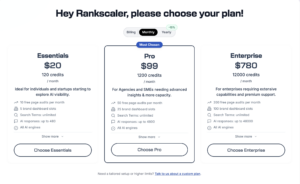
You’ll have the option to choose the $20 Essentials, $99 Pro, or $780 Enterprise plan. I recommend starting with the $20 plan so you can get a feel for the platform. If you decide to upgrade later, you’ll only need to change your plan in your account. All of your prompts and settings carry over.
4. Enter your credit card information
There’s no free trial with Rankscale, so you’ll need to fork over your credit card details before you can go any further. The good news is that there aren’t any hidden charges. The $20 plan truly is exactly $20 flat each month.
5. Create a brand
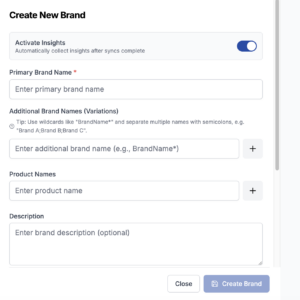
On the left-hand menu, select the + sign under “Brands.” This will open a pop-up window to create a new brand.
Enter your brand name and any variations. You can also add product names, if applicable.
Add your website’s URL. This will most likely be your home page. However, if you are tracking a subbrand, use the main URL of the product or subbrand page.
6. Add prompts to track
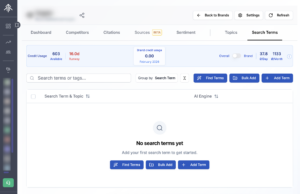
On the far right of the top menu, choose “Search Terms.” This will show you a dashboard of all the prompts you’ve entered, whether they’re active, how often you’re tracking them, and which models you’re tracking against. Click “Add Term.”
7. Choose your models and frequency
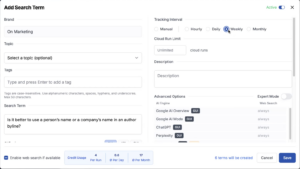
Type the prompt you want to track into the “Search Term” box. If you want, you can assign it to a topic or tag. This can make it easier to find groups of prompts later if you end up having a lot of them.
This is also where you’ll choose the models you want to track and the frequency: hourly, daily, weekly, or monthly. A helpful box at the bottom of the pop-up tells you how many credits you’ll use per run, day, and month based on your selections. Save when you’re done.
8. See an overview of search terms
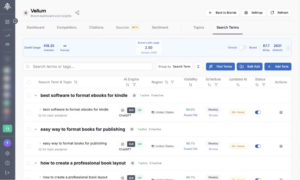
Go back to the “Search Terms” page to see an overview of the results for your prompts. You can click on each one by model to see results by LLM.
9. See details of prompt visibility by AI model
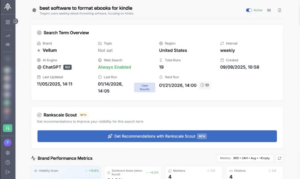
When you click on an individual prompt, you can see its visibility score for the AI model you selected, along with its average position, number of mentions and citations, and a full history of executions.
Rankscale brand dashboards
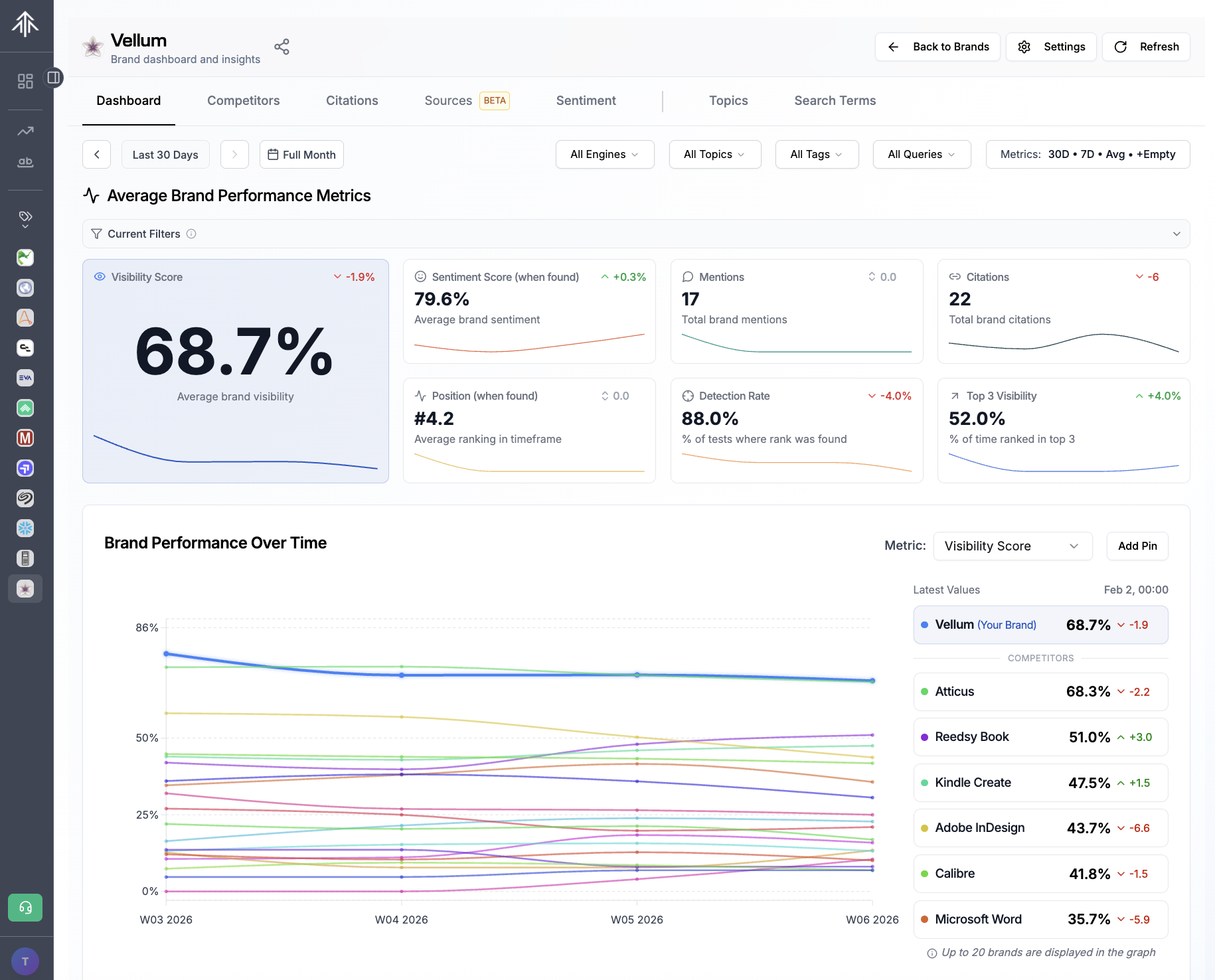
After you’ve set up your brand and prompts, you’ll access everything through your brand dashboard. The $20 Rankscale plan gives you five brand dashboard slots, which works fine for most users. In fact, if you’re a startup or a smaller company, you probably only need one dashboard. Of course, you can always use the others to monitor sub-brands or individual products.
One of my only complaints about Rankscale is that their brand dashboards aren’t very pretty. But they are extremely functional and give you a granular level of control, which I love.
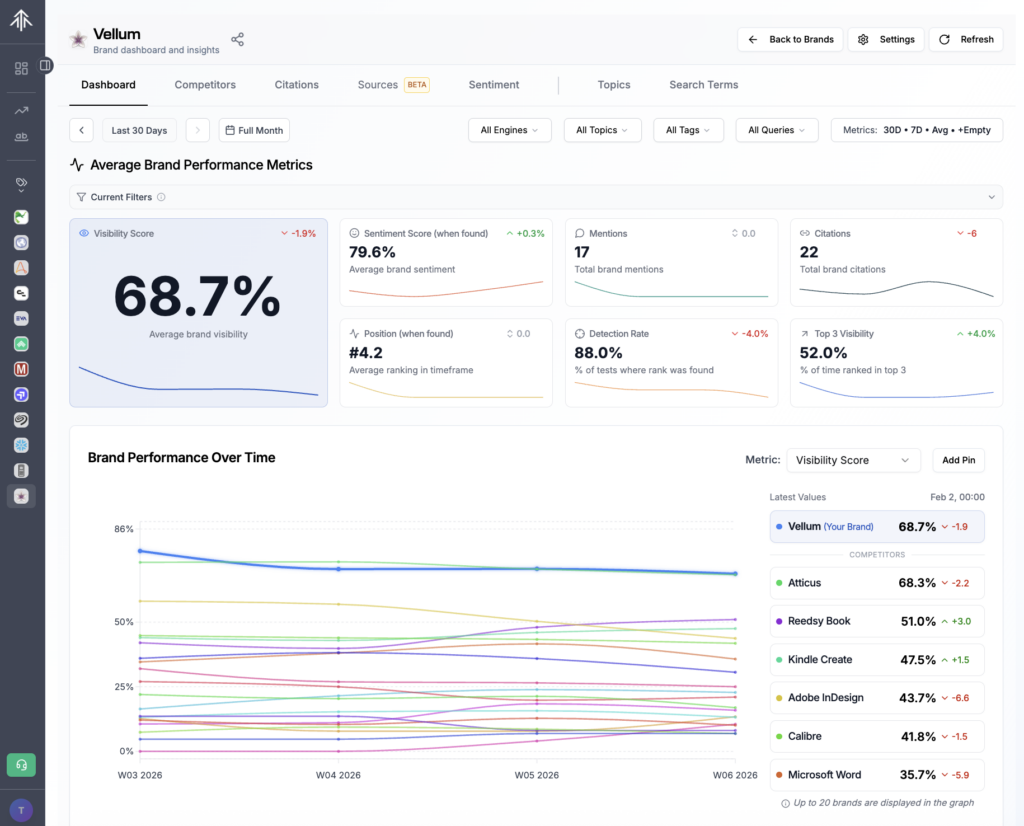
You can share a link to your brand dashboard with your team or clients, which is good since Rankscale doesn’t have any report generation tools. That said, you can always take screenshots or make PDFs of the dashboard for your brand or any individual prompt performance results. And if you spring for the $99 plan, you get access to the API, which you can use to export data into Looker Studio.
Here’s what you’ll see on Rankscale’s brand dashboard:
- Your average brand visibility across all the prompts and models you’re tracking. This tells you about how often you come up in AI-generated answers.
- Mentions and citations. A mention means your brand is named in the AI-generated answer. A citation means your website is used as a source in the answer. You can have mentions without citations, and vice versa.
- A sentiment score for when your brand is mentioned. This is not available with the $20 plan, but you can get it with any plan $99 and up.
- A line chart of performance over time compared to your competitors. You can see visibility or choose another metric from the drop-down menu.
- Performance by topic, if you’ve assigned topics to your prompts.
- Performance by model (e.g., ChatGPT, Google AI Overviews, Gemini).
- Share of voice and citations over time.
You can change the time frame and aggregation (daily, weekly, monthly) and the line charts will adjust accordingly. You can also filter by AI model, topics, or tags. This is more control than I’ve seen with other AI visibility dashboards, and it gives you a lot of ways to view performance over time.
At the top of the dashboard, there are additional tabs for more analysis:
- Competitors shows the position and other metrics for your brand and each competitor.
- Citations shows which sources are most commonly cited for the prompts you’re tracking.
- Sources shows the top URLs on your own domain that are being cited in AI-generated answers, plus the top domain for the prompts you’re tracking.
- Sentiment (available with the $99 plan or higher) shows an overview of brand sentiment for your brand and your competitors.
- Topics shows search terms grouped by topic, if you’ve labeled your prompts.
- Search terms show a list of the prompts you’ve set up, which you can click to view more detail by prompt and AI model.
When you click on an individual prompt, and then click “View detailed insights,” you get a similar dashboard as on the brand page. This dashboard is also customizable by date range and aggregation. It shows:
- Your average visibility score for the prompt and model selected.
- Sentiment, mentions, citations, position, detection rate, and the percent of time you show up in the top 3 brands mentioned.
- A line chart showing brand performance over time.
- Top brands mentioned across all recorded answers.
- Sources that come up most frequently for the prompt.
- A search query fanout that shows similar questions related to the original prompt.
- A full history of executions, each one showing which brands were mentioned, plus an option to view the answer itself and any citations.
One note: By nature, LLMs are variable. It’s normal that they give different responses to the same question each time they’re asked. Sometimes, you might not see any brands mentioned in the answer to your prompt. Or you might see different brands in different orders. That’s why you should monitor your brand visibility over time, not just in a single snapshot.
Rankscale page audits
In addition to prompt tracking, the $20 Rankscale plan gives you 10 free page audits a month. Page audits give you an automatically-generated performance analysis of AI visibility for any page on any website. This can be helpful if:
- You’re new to search/answer engine optimization and want some quick tips about where to start making changes.
- You have a few pages you want to track regularly and show overall improvement.
- You want to audit a competitor’s page and see what they’re doing well (or not so well).
If you’re a small to mid-sized brand, it’s a good idea to start with an audit of your home page, plus any pillar pages. If you have multiple products or sub-brands, plan to run an audit of your those pages at least once a month. For active campaigns, you may want to audit landing pages once a week.
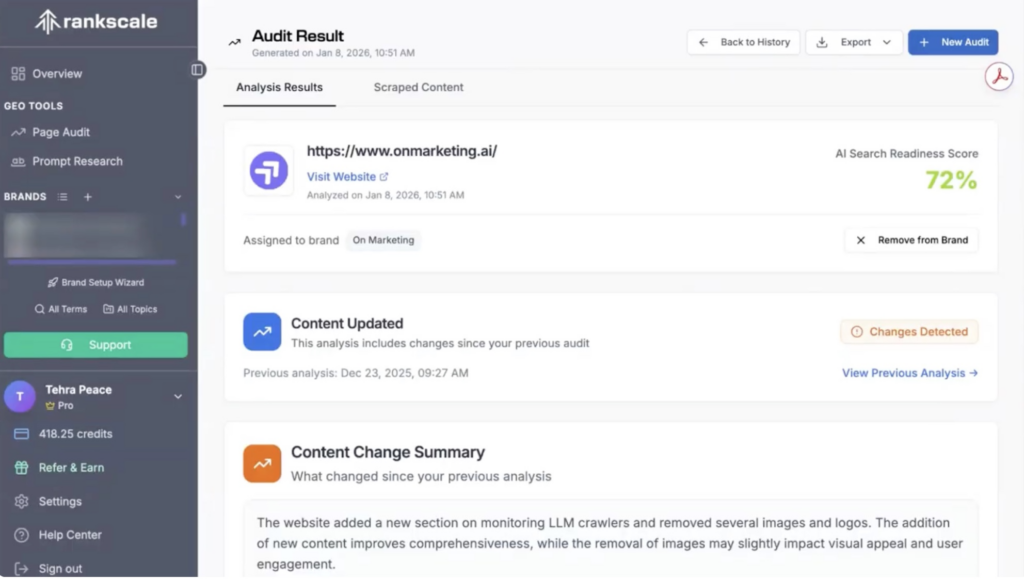
The first thing you’ll see is an AI search readiness score. If you keep scrolling, you’ll also see individual scores for each aspect of searchability. Now, I know we like numbers. You might think about putting these numbers on a report to your management team with the idea that they’ll go up later after you’ve updated the page.
Don’t do this!
I’m not exactly sure how Rankscale comes up with these scores, but they’re wildly inconsistent. I’ve run audits on the same page back-to-back and received different results each time. Like most generative AI functions, this is a bit of a black box, and you can’t always explain why it changes. So, either take the scores with a grain of salt or ignore them altogether.
The rest of the audit can be pretty helpful if you continue to ignore the AI-generated scores you get for each aspect of searchability. Here’s what you get:
- A summary paragraph about the page contents and how easily it can be consumed by AI search engines.
- A score and analysis of content quality and relevance, including relevance to user intent, accuracy and currency, comprehensive coverage, long-tail keywords, and natural language.
- A score and analysis of authority and trustworthiness, including company information, affiliations, legal compliance, social media presence, and testimonials.
- A score and analysis of technical SEO and page structure, including headings structure, links, meta info, readability, and alt text.
- A score and analysis of engagement, including contact info, structured content, language, calls to action, and multimedia.
- Recommendations in each section for how to improve scores; for example, integrate more FAQs or expand on use case scenarios.
- AI-generated suggestions to improve content with an explanation of why it should improve AI search visibility.
All things considered, these page audits pack in a lot of guidance that can be extremely helpful. They’re great for quick fixes and surprisingly prescriptive. Just don’t use any of the scores as marketing performance metrics.
You’ll “spend” one audit every time you analyze a page, even if it’s the same page. You can run more audits if you need to, but you’ll use 5 credits each time, which is still a pretty great deal.
Where does Rankscale fall short?
When it comes to prompt tracking, Rankscale offers as much functionality as its (much more expensive) competitors. But there are a few downsides:
- Rankscale’s interface is not intuitive and can take a little effort to learn. This might intimidate some users who, for a similar price, can get better hand-holding (if less functionality) through the $29 OtterlyAI.
- Rankscale’s dashboards aren’t very polished. Even though they are some of the most full-featured dashboards, they won’t impress your boss based on looks alone.
- There’s no native report generation tool. You can only share the dashboard, take screenshots, or print PDFs.
- Page audit scores are inconsistent and not explainable enough to use as a reliable marketing performance metric.
Rankscale is the best AI visibility platform for the price
In spite of its few shortcomings, Rankscale is a dream for people who want lots of granular control over prompt monitoring. Even if you choose another AI visibility platform, I recommend spending the $20 to set up Rankscale as an additional tool. Before you pay anything, you can generate a quick audit at Rankscale’s home page.
To see Ranksale in action, watch my Rankscale AI review and tutorial video.