
The Scrunch AI visibility platform has one feature that many other platforms don’t: LLM crawler bot tracking.
I use several AI visibility platforms, both for my clients’ brands and for monitoring my own performance with On Marketing. Scrunch has become one of my favorites, mostly because it’s slick and has a nice-looking dashboard that I can share with my clients, which makes me look good to any enterprise prospects.
I’ve been using Scrunch for about three months. Because I joined the agency partner program, I get to preview upcoming features. The product team seems to be pretty ambitious about developing new features, which is helpful since answer engine optimization is still new, and we won’t know what works best until we try it.
Scrunch offers a lot of the same features as other AI visibility platforms (like Peec, Profound, and Rankscale), so it can be hard to tell the difference between them. However, one thing that I haven’t been able to find in other platforms is Scrunch’s Agent Traffic feature, which lets you see which LLM crawler bots are visiting your site. This has become one of my all-time favorite AI visibility monitoring tools, and I’m honestly surprised Scrunch doesn’t advertise it more. If you use Scrunch or are comparing it to other platforms, you can check out my demo of Scrunch Agent Traffic monitoring on YouTube.
What are LLM crawlers?
LLMs like ChatGPT and Perplexity don’t automatically know that your content exists. They use agents (also called bots or crawlers) to discover and retrieve content from your site. We’ve made a list of popular AI crawler bots and which LLMs they serve if you’re curious about what’s out there.
There are three types of LLM crawler bots based on what they’re doing with your content:
- Retrieval bots fetch content on demand to help generate answers in real time. This is how your content shows up in an answer even if the model hasn’t been trained on it. Retrieval bots help keep AI-generated answers fresh with the latest information. If you have a lot of retrieval bots on your site, it’s a good sign that you’re creating authoritative content.
- Indexing bots crawl and organize content so that retrieval systems can easily find it later. This is similar to how search engines like Google build indexes. You can make your site friendly to indexing bots with a clear content architecture and strong internal linking.
- Training bots collect content to train or fine-tune LLMs. Rather than using your content to generate answers right away, training bots shape the long-term knowledge of the model. You should create original and high-quality content to increase the chances of your brand’s concepts becoming part of a trained model.
Why monitor LLM crawlers?
When you know which LLM crawler bots are visiting your site, how often, and what they’re looking at, you can understand what kinds of content AI answer engines find the most useful. You can also see which of your content is influencing AI-generated answers and validate that your content is actually accessible to LLMs, so you’re not just screaming into the void.
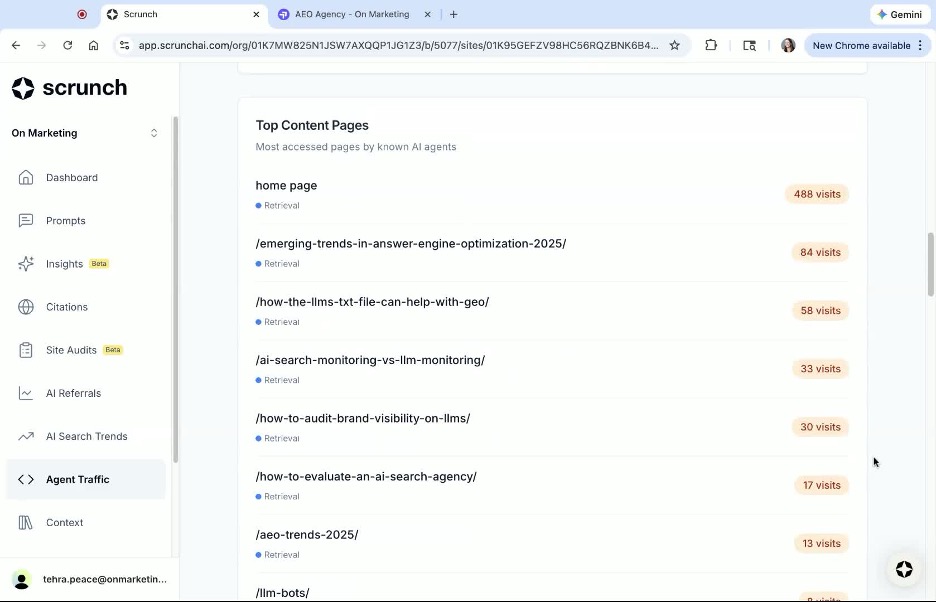
For example, take a look at my list of pages most accessed by AI agents, as of earlier this week. After my home page, my most popular content is about AEO trends in 2025, which makes sense since LLMs love numbers. My second-most popular page is an article about llms.txt files. I should consider making more of this content, but I should also keep watching this list to see if other topics become popular.
How to set up Agent Traffic monitoring in Scrunch
Before you can see LLM crawler traffic, you’ll need to connect your site. This is where you’ll need help from your webmaster. From the Scrunch side of things, requesting the connection is easy:
- From your main dashboard, click on the “Agent Traffic” tab on the left side of your screen.
- Click “Connect Site.”
- Type your domain name.
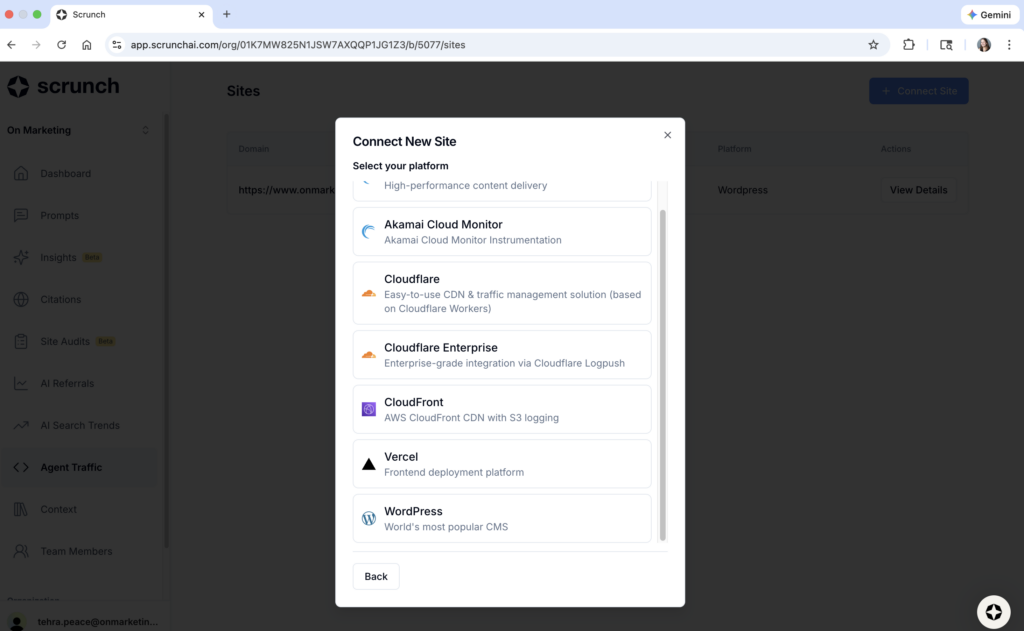
- Choose your content management platform.
From there, Scrunch will generate instructions you can send to your webmaster to finish making the connection. These will include a site ID, webhook URL, and API key.
Scrunch supports Agent Traffic on most of the major content management platforms, including:
- Akamai
- Akamai Cloud Monitor
- Cloudflare
- Cloudflare Enterprise
- CloudFront
- Vercel
- WordPress
For content management systems that don’t provide raw CDN logs, Scrunch offers a workaround to enable Agent Traffic. This offers support for:
- Webflow
- Shopify
- BigCommerce
- Squarespace
- Wix
- HubSpot CMS
- Uberflip
Once your webmaster or IT team has configured your content management platform, Scrunch will activate Agent Traffic monitoring within about 5-10 minutes. I use WordPress for On Marketing and made the configuration myself. The whole thing took less than 20 minutes, but then again, I didn’t have to bother submitting a ticket to myself.
AI Agent Traffic over time
The first thing you’ll see in the Agent Traffic tool is an overview of bot traffic over time. You can adjust the date range to show the last day, week, 4 weeks, or 12 weeks. You can also choose a custom view.
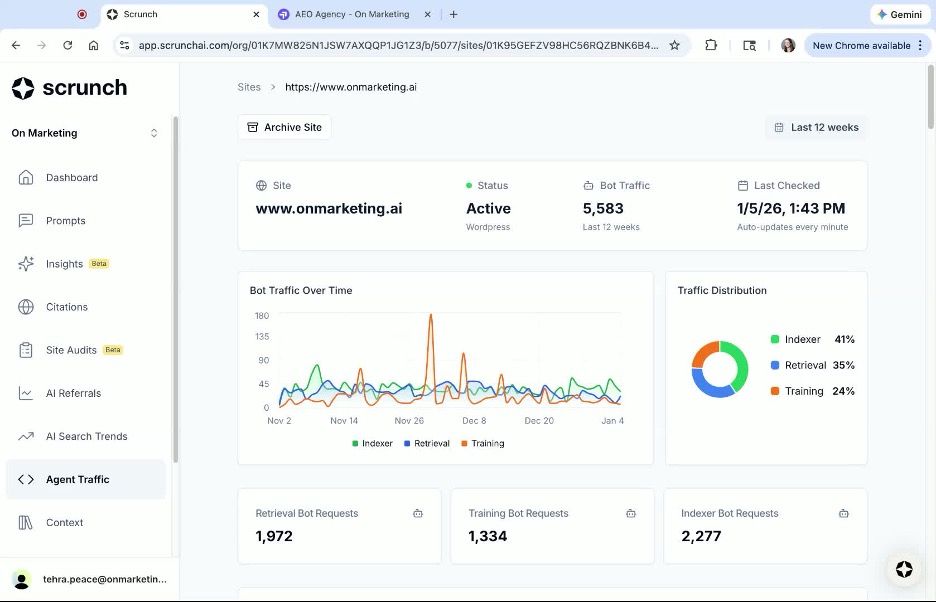
This is an excellent way to see spikes and trends and a glance. In the image above, I had a surge of training bot traffic around late November/early December. I would love to see Scrunch add the ability to check historical data here, so that I could see which training bots were visiting and what content they were accessing at that time.
You can also see the traffic distribution of retrieval, indexing, and training bots. These percentages fluctuate over time. That said, if you tend to see more training bots than retrieval bots, it generally means that your content is valuable enough to help teach models, but isn’t being used much to answer live questions. This could mean less attribution and referral traffic, but a longer-term influence on how models understand your area of expertise.
If you see more retrieval bots, your content is being used to actively answer real questions, not just train models.
Human vs. bot traffic
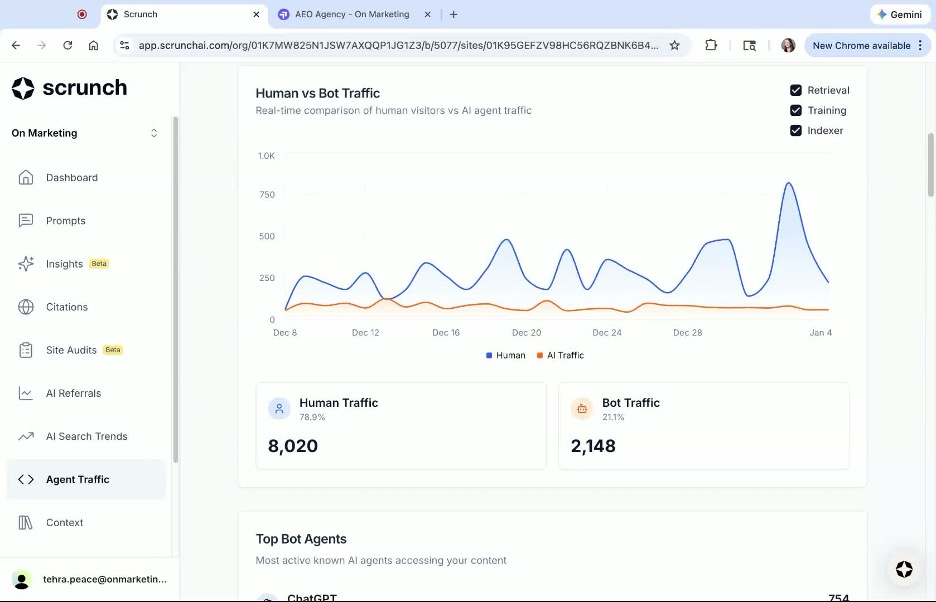
Scrolling a little further, you’ll find a nice line chart of human vs. bot traffic over time. While this chart may be somewhat useful, it is a bit misleading. That’s because the “human traffic” doesn’t actually represent the number of real people visiting your site. This took me a bit of time to figure out, but eventually I compared it to my impressions in Google Search Console, and the numbers matched.
So think of human traffic not as actual visitors to your site, but how many times one of your pages appeared on a Google search results page.
Top LLM crawler bots visiting your site
The next section is one of my favorite parts. This feature shows the top agents accessing your content. I’m delighted to see ChatGPT at the top of the list, and this makes sense because a lot of my content comes up in ChatGPT answers for the prompts I monitor for On Marketing. This means I’m probably doing a good job creating content that’s relevant to the questions people are asking ChatGPT.
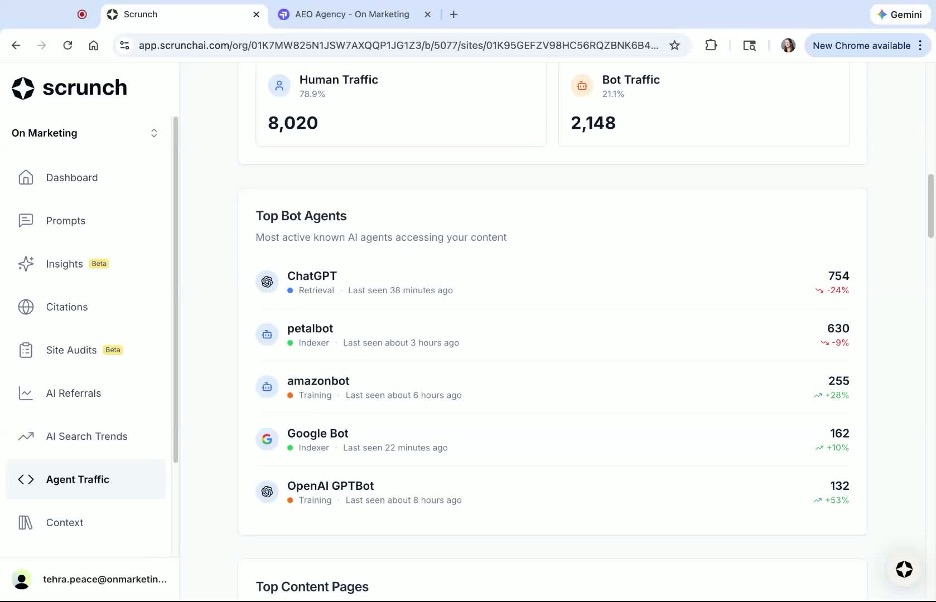
In addition to knowing which bot visited your site, you can also see when it was last seen and why it was there: for retrieval, indexing, or training.
When I first started monitoring AI visibility for On Marketing, I was surprised at how quickly my new blog articles would be cited in a ChatGPT answer to the prompt I was tracking. Sometimes, I’d see results within just a day or two. Now that I can see the LLM bot traffic to my site, it’s clear why that was happening. ChatGPT retrieval bots visit On Marketing’s website several times a day, so they’re always getting new information. In the screenshot above, a ChatGPT retrieval bot had been on my site 38 minutes earlier.
Top pages visited by LLM crawler bots
As I mentioned earlier, one of the most useful features in Scrunch Agent Traffic monitoring is the list of top pages visited by LLM bots. This is one of the best ways to understand which of your content is performing best. Let’s expand on that a little.
It used to be that you’d want to know which pages got the most click-throughs from Google searches, which can be easily found in your Google Search Console. This is still important, as the majority of searches are still happening through Google. But when people outsource search to ChatGPT and other LLM chatbots, a human may never click through to your page. These are called “zero-click” search results.
Theoretically, you could have an insanely popular page that has valuable content, but a low number of human clicks. That’s why it’s so important to monitor LLM crawler traffic. Scrunch Agent Traffic will show you which pages were most visited by LLM crawler bots, giving you a better idea of which content to make more of.
Recent bot requests
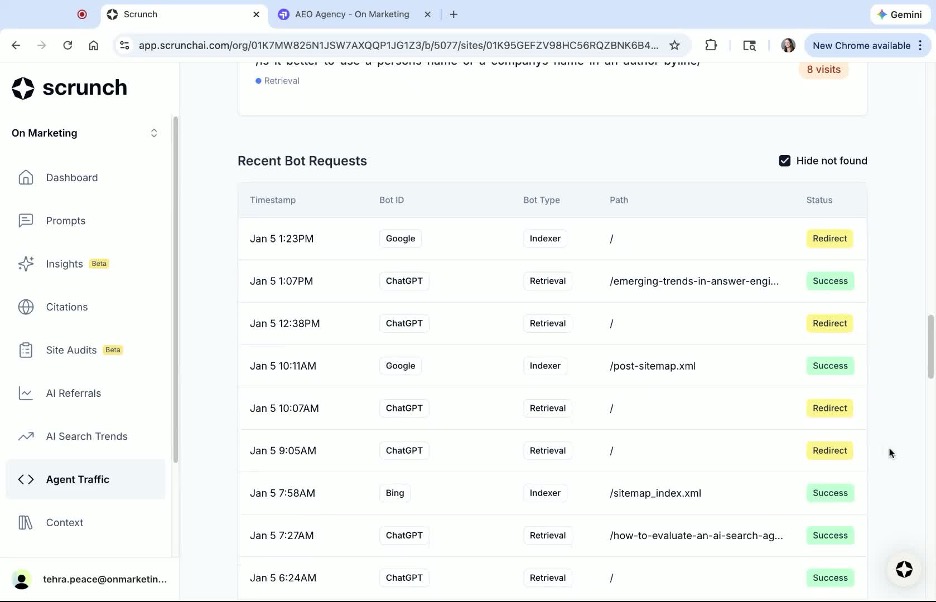
The last thing you’ll see on the Agent Traffic page is recent bot requests. They tend to be from the last 24 hours or so. I always find it rewarding (and validating) to see the list of all the bots that have recently visited, what they’re looking at, and whether they’re retrieving, indexing, or training.
Check your LLM crawler bot traffic regularly
I really do like that Scrunch offers the ability to track LLM bot traffic right within your AI visibility platform. If you already use Scrunch, you should definitely work with your webmaster to connect your site and take advantage of this feature. If you’re comparing platforms and like the idea of having this tool integrated into your AI visibility dashboard, then Scrunch has the competitive edge.
However you monitor LLM bot traffic, make sure to regularly check your dashboard (weekly if possible) to spot trends in content popularity or identify any gaps in bots that aren’t visiting your site. As always, On Marketing can set up and report on LLM bot traffic for you, so that you can focus on creating high-visibility content.